The backup is the target now
For years, backups were treated as the boring insurance policy at the bottom of the IT budget. Set the nightly job, watch it go green, move on. That assumption is exactly what modern ransomware crews are built to exploit. Before they encrypt a single production server, they go looking for your backup infrastructure, and they are very good at finding it.
The numbers are blunt. Veeam's Ransomware Trends research found that backup repositories were targeted in 96% of attacks, and roughly 76% of those attempts succeeded in compromising at least some backup data. Sophos, in its State of Ransomware reporting, put the average recovery cost at well over a million dollars, and around eight times higher for organisations whose backups were hit. Verizon's 2025 Data Breach Investigations Report noted that 44% of breaches it analysed now involve ransomware, up from 32% the year before. Fortinet's data has been consistent for a while: of the organisations that pay, only about 4% get all of their data back.
We work with banks, telecom operators, and critical-infrastructure clients across the UAE and the wider GCC, and the pattern we see on the ground matches the reports. The organisations that come through an attack in days rather than months are not the ones with the biggest security budgets. They are the ones whose recovery copy was genuinely out of the attacker's reach, and who had actually tested a restore before they needed one.
"We have backups" and "we can recover" are two different claims
Most companies that get hit did have backups. The problem is where those backups lived and who could reach them. A nightly snapshot sitting on a domain-joined NAS, reachable with the same Active Directory credentials the attacker just harvested, is not a recovery copy. It is one more encryption target that happens to be labelled "backup."
This is the gap that turns a bad week into a bad quarter. Sophos has repeatedly measured median full-recovery times north of 100 days for organisations that lose their backups in the attack. Three months of degraded or halted operations is an existential event for most mid-market firms, and a regulatory and reputational one for a bank. Paying the ransom does not close the gap either, because the decryptor you get back is slow, buggy, and incomplete, which is why that 4% full-recovery figure is so low.
So the real question is not "do we run backups." It is narrower and more uncomfortable: if every Windows and Linux host in the estate were encrypted tonight, and the domain itself were compromised, which copy of the data would still be trustworthy tomorrow morning, and how long would it take to stand the business back up from it? If you cannot answer that with a number you have actually measured, you do not yet have a recovery capability. You have a hope.
The 3-2-1-1-0 rule, and the two digits everyone skips
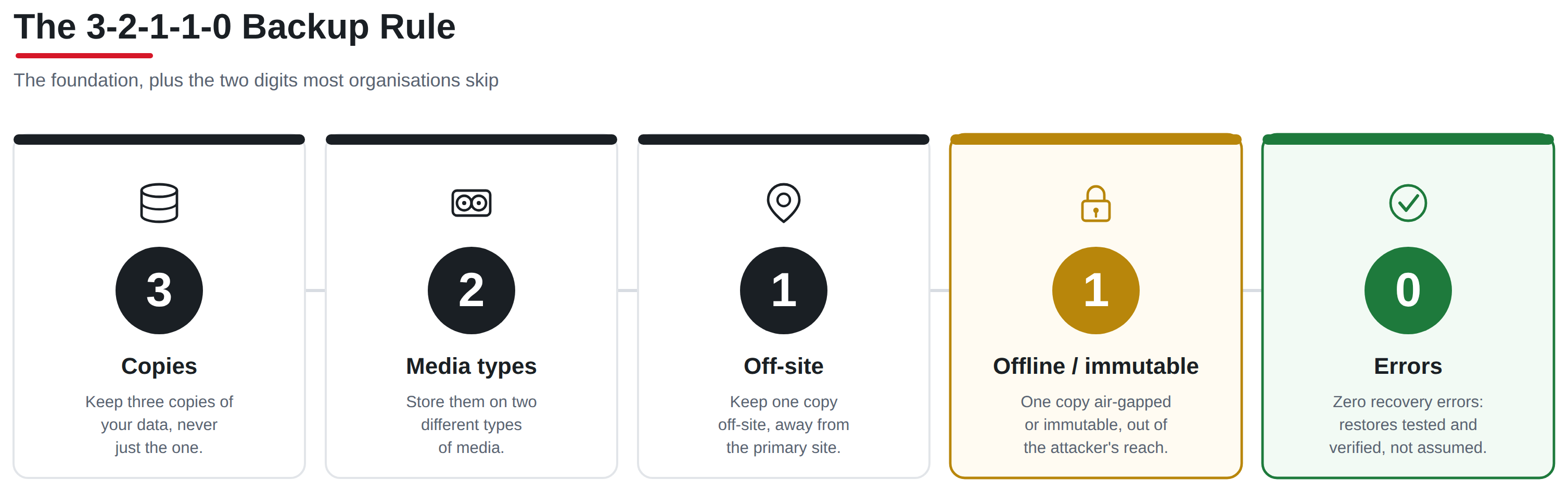
The classic 3-2-1 rule has aged well: keep three copies of your data, on two different types of media, with one copy off-site. It is still the right foundation. What it predates is an adversary who deliberately hunts the backup plane, so the industry extended it. The current shape is 3-2-1-1-0, and the value is almost entirely in the last two digits.
The extra 1 is one copy that is offline, air-gapped, or immutable, meaning it cannot be altered or deleted even by an administrator account, and ideally cannot be reached over the production network at all. The 0 is zero recovery errors: a backup you have actually restored and verified, not one you assume is good because the job reported success. In our experience the 0 is the digit that gets skipped most often, and it is the one that decides whether a restore works when the pressure is on.
 A backup job that finishes without error is telling you it finished, nothing more. It is not telling you the data is consistent, that the application will start from it, or that the restore will fit inside your recovery-time objective. The only way to know those things is to perform the restore on a schedule and time it. Treat the untested backup as unverified until proven otherwise.
Immutable or air-gapped: what each one actually buys you
These two words get used interchangeably in vendor decks, and they are not the same control. Immutability means the data cannot be changed or deleted for a defined retention window, usually enforced through object-lock or write-once-read-many storage. Air-gapping means the copy is physically or logically disconnected from the production environment, so an attacker who owns your network still cannot reach it. You want both properties on your last-resort copy, but they defend against different moves.
PropertyImmutable storage (object-lock / WORM)Air-gapped copy (offline / isolated)
Stops deletion by a stolen admin account
Yes, for the locked retention period
Yes, while disconnected
Stops network-based tampering
Partially; still reachable, just not writable
Yes; not reachable at all when offline
Protects against a compromised backup console
Only if lock is enforced below the console (compliance mode)
Yes, if the gap is real and credentials are separate
Typical implementation
Cloud object storage with compliance-mode lock, hardened Linux repo with immutability, WORM appliance
Tape rotated out, powered-off replica, isolated vault with separate identity plane
Main failure mode
Lock set in "governance" mode that an admin can override
The gap quietly closes because someone leaves the link up for convenience
The failure modes in that last row are where we spend a lot of our review time. Object-lock configured in governance mode instead of compliance mode can be lifted by exactly the privileged account an attacker is trying to steal, which defeats the point. And an air gap that is "mostly" closed is not an air gap. If the vault shares credentials with production, or the replication link is left permanently open for operational convenience, it is a network share with extra steps. The control has to be enforced below the layer the attacker can reach, and it has to be verified, not assumed.
Design the recovery assuming the attacker is already inside
Prevention and recovery are different disciplines, and confusing them is a common and expensive mistake. Prevention tries to keep the attacker out. Recovery starts from the assumption that they got in, moved laterally, and had time to sit quietly in the environment before pulling the trigger. If your recovery plan restores straight back into the same domain, using the same credentials, without checking whether the restored data itself carries the attacker's foothold, you can re-infect yourself on day one and start the clock over.
A recovery capability that holds up has a few non-negotiable properties. It uses an isolated recovery environment with its own identity plane, so the credentials the attacker stole are useless there. It scans restored systems for indicators of compromise and dormant persistence before anything is promoted back to production, because the malware is often sitting in the backups too. And it rebuilds trust from the ground up, starting with clean domain controllers and a known-good identity foundation rather than restoring the compromised directory wholesale.
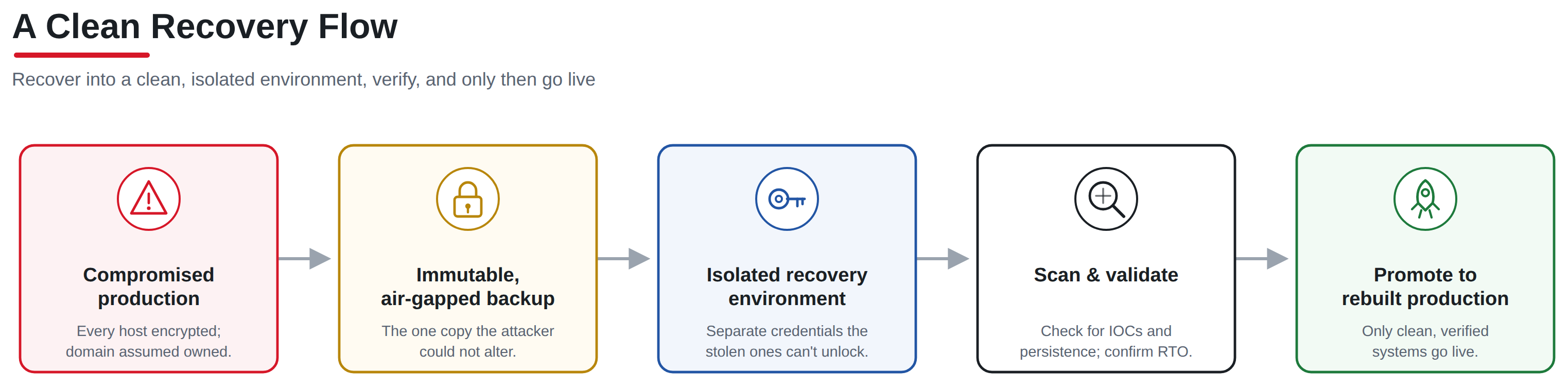 Standing this up is where a lot of Aydahwa's hardening work has gone in practice. We provision recovery and clean-room environments from CIS-benchmarked, air-gap-capable Windows and Linux images, so the systems you recover into are hardened by default rather than carrying forward whatever configuration drift helped the attacker in the first place. The recovery environment should be the cleanest part of your estate, not a hurried copy of the environment that just failed.
What the standards actually ask for
If you operate in a regulated sector, and in the GCC most of our clients do, this is not only an operational question. It is a control the auditors will test. The good news is that the major frameworks are aligned on what a defensible backup and recovery posture looks like, so building it well satisfies several obligations at once.
- NIST Cybersecurity Framework puts this squarely in the RECOVER function, and the 2.0 revision's stronger emphasis on GOVERN means someone has to own recovery objectives and prove they are exercised, not just documented.
- ISO/IEC 27001:2022 control A.8.13 covers information backup directly, and A.5.29 and A.5.30 address continuity and ICT readiness. An assessor will want evidence of tested restores, not a policy statement.
- CIS Controls v8 Control 11 is dedicated to data recovery, and it explicitly calls for automated, protected, and tested backups, including isolating recovery data from the production network.
- PCI DSS ties backup and recovery to the incident-response requirements in Requirement 12, so for anyone handling cardholder data the tested-recovery expectation is explicit.
The common thread across all of them is evidence. "We back up nightly" is a statement. A dated restore log showing a full recovery inside a defined RTO, from an immutable copy, with the identity plane separated, is evidence. Build for the evidence and the compliance mostly takes care of itself.
A readiness checklist you can act on this quarter
You do not need a forklift project to close the biggest gaps. Most of the risk sits in a handful of items that are cheap to check and expensive to ignore.
- Confirm at least one backup copy is genuinely immutable, and that the lock is set in compliance mode, not a governance mode an administrator can override.
- Separate the backup and recovery identity plane from production. The credentials that run the domain must not be able to delete the backups.
- Keep one copy offline or air-gapped, and verify the gap is actually closed on the schedule you claim, rather than left open for convenience.
- Run a real restore on a fixed cadence, at least quarterly for tier-one systems, and time it against your stated recovery-time objective.
- Scan restored systems for indicators of compromise before promoting anything back to production, so you do not reinstate the attacker's foothold.
- Write down an RTO and RPO for each system tier, agreed with the business, so recovery priorities are decided before the incident, not during it.
- Run a tabletop exercise that assumes the domain is compromised and the primary backup console is untrusted, and see whether your plan still has a path to clean data.
If you can only do one of these this quarter, do the fourth. A timed, verified restore tells you more about your true resilience than any amount of dashboard green, and it usually surfaces the other gaps on its own.
How Aydahwa Enterprise Can Help
Ransomware resilience has to be built and then proven. No product delivers it out of the box, and no dashboard tells you it is real. At Aydahwa Enterprise we help organisations across the UAE and GCC design and validate exactly the recovery capability described here: immutable and air-gapped backup tiers, isolated recovery environments provisioned from CIS-hardened Windows and Linux images, and tested restore procedures with measured recovery objectives that stand up to an auditor.
Our cybersecurity services cover the assessment and hardening side, mapping your current posture against NIST CSF, ISO 27001, and CIS Controls and closing the gaps that matter most. Through our cloud services we build immutable, object-locked backup tiers and isolated recovery environments across on-premises and cloud, and our managed IT support keeps the restore testing and monitoring running so the capability does not quietly decay between audits.
If you want a quick read on where you stand, our free cybersecurity self-assessment and readiness checklist are a practical starting point. When you are ready to pressure-test your recovery plan against a realistic attack, get in touch and we will help you find the gaps before an attacker does.