What Makes a Production Migration So Hard
Every serious infrastructure team eventually hits the same wall. The database that carried the business for five years can no longer keep up. The application server is running an operating system that is about to lose support. The data centre contract is ending and the workloads have to move to the cloud. The technical answer is obvious: replace the old thing with a better one. The hard part is that the old thing is still running, and thousands of people are depending on it right now.
This is the difference between building a system and migrating one. A greenfield build starts from nothing and has no users to disappoint. A migration has to change a component that is actively serving traffic, without the customers noticing, without losing a single order, and without breaking the dozen other applications that quietly depend on the piece being replaced. At scale, copying the existing data alone can take days, and during those days the source keeps changing underneath you.
We have run these migrations for telecom operators, banks, and connectivity providers where downtime is measured in revenue lost per minute and, in regulated environments, in compliance breaches. The engineering is only half the work. The other half is designing every intermediate state so that business continues normally even while the system is half-old and half-new. That is what this article is about: the patterns that hold up under real production load, the sequence of a clean cutover, and the places where migrations quietly go wrong.
The Patterns That Actually Hold Up
There are three migration strategies that survive contact with production traffic. Each trades risk against effort and speed differently, and choosing the wrong one for the situation is the most common early mistake we see.
Big-bang cutover
You freeze writes, copy everything, switch the application to the new system, and turn the old one off. It is simple to reason about and cheap to build, and for a small internal tool with a maintenance window it is often the right call. The problem is that it concentrates all the risk into a single moment. If the cutover fails at 02:00 on a Sunday, you are rolling back under pressure with the clock running. For any system that cannot tolerate a maintenance window, big-bang is the pattern to avoid, not default to.
The strangler pattern
Named after the strangler fig that grows around a tree until the original is gone, this approach routes a small slice of functionality to the new system, proves it works, then moves another slice, and another, until nothing is left on the old one. A routing layer, an API gateway or a proxy, sits in front and decides which requests go where. This is how we broke apart monolithic banking workloads into serviceable pieces without a single big-risk night. It takes longer and the routing layer is real work, but the blast radius of any single step is small, and you can stop and reassess at any point.
Parallel run with dual writes
The new system runs alongside the old one. Every write goes to both, reads keep coming from the old system until you trust the new one, and a validation process compares the two continuously. When the numbers match for long enough, you flip reads to the new system and retire the old. This is the workhorse pattern for database and storage migrations where correctness is non-negotiable. It costs the most in engineering and infrastructure because you are running two systems and reconciling them, but it gives you something the other two cannot: proof, under real traffic, that the new system produces the same answers before you commit to it.
Choosing Between Them
The right pattern depends on how much downtime the business can absorb, how large the dataset is, and how many other systems depend on the component. The table below is the rough decision matrix we start from.
| Factor | Big-bang cutover | Strangler pattern | Parallel run / dual write |
|---|---|---|---|
| Downtime tolerated | Maintenance window required | Near zero | Near zero |
| Rollback difficulty | Hard, time-pressured | Easy, per slice | Easy, reads still on old system |
| Engineering effort | Low | High (routing layer) | Highest (two systems + reconciliation) |
| Best for | Small systems, internal tools | Monoliths, service decomposition | Databases, payments, stateful stores |
| Main risk | All risk in one moment | Routing complexity, long timeline | Write amplification, drift between stores |
The Zero-Downtime Cutover, Step by Step
When downtime is not an option, the parallel-run approach turns into a specific, repeatable sequence. The diagram below shows the flow we follow for a stateful migration such as moving a production database or a core application store.
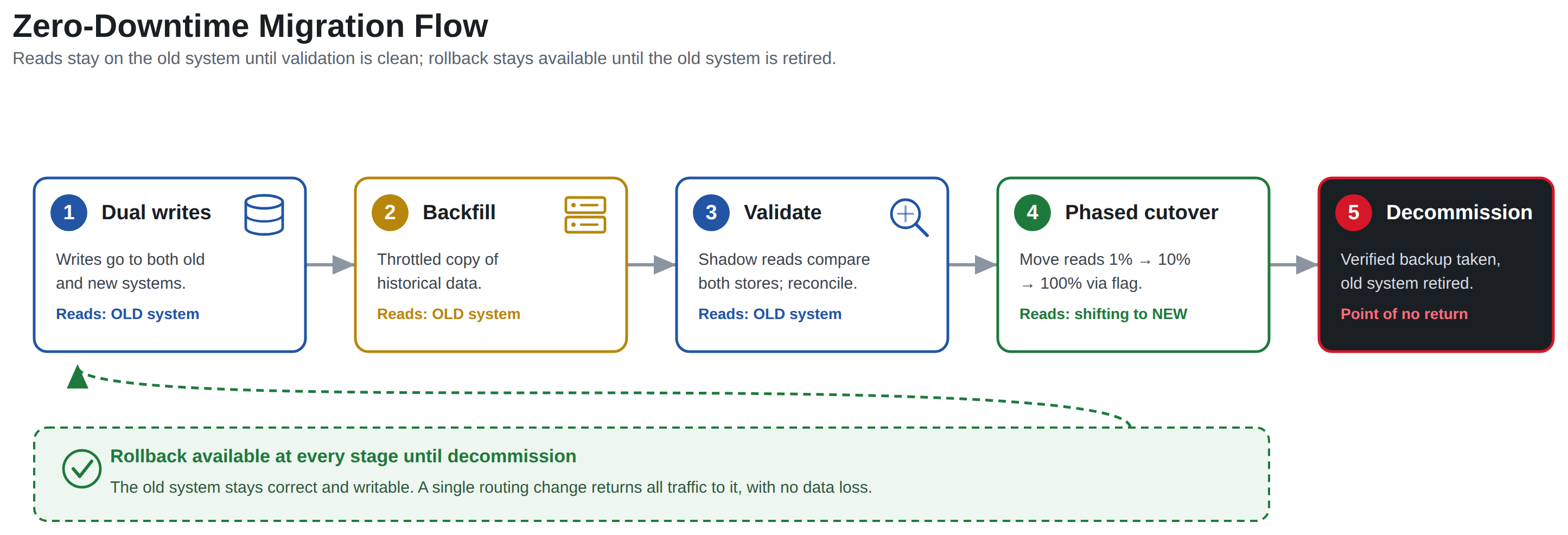
The sequence matters, and skipping a stage is how teams end up with silent data loss.
- Turn on dual writes. The application starts writing every change to both the old and the new system at the same time. From this moment forward, no new data is lost during the migration, because both stores stay current. Reads continue to come only from the old system.
- Backfill the history. A separate, throttled process copies the existing historical data into the new system. This runs in the background and can take hours or days for large datasets. Because dual writes are already active, the backfill only has to worry about old records, not moving targets.
- Validate with shadow reads. Every read hits the old system for the real answer and also queries the new system in the shadow, comparing the two. Row counts, checksums, and record-level diffs surface any drift. In our engagements this stage runs for days or weeks, not minutes, because the whole point is to catch the one-in-a-million edge case before customers do.
- Cut over reads in phases. Once validation is clean, you move read traffic to the new system gradually, one percent, then ten, then fifty, watching latency and error rates at each step. A feature flag or routing rule controls the percentage so you can dial it back instantly.
- Decommission the old system. Only after reads have run fully on the new system for a safe period, and you have a verified backup, do you turn off dual writes and retire the old store. This is the point of no return, and it should feel almost boring by the time you reach it.
- Keep rollback available the whole way. Until decommission, the old system is still correct and still writable. At any stage before that, you can route everything back to it with a single change. A migration without a live rollback path is a gamble, not a plan.
Where Data Migrations Go Wrong
The strategy is the easy part to write down. The failures we get called in to fix almost always live in the data, not the diagram.
The first is drift between the two stores during a parallel run. Dual writes look simple until one write succeeds and the other fails midway through a request. Now the systems disagree and nobody notices until reconciliation flags it, or worse, until a customer sees the wrong balance. Change data capture tools such as Debezium reading the database transaction log are more reliable than application-level dual writes for exactly this reason, because they replicate committed changes rather than hoping two writes both land. On a recent global SaaS scale-up we moved a multi-tenant platform across AWS, GCP, and Azure and grew it roughly tenfold with no material service regression, and the single biggest reason it held was that reconciliation was continuous and automated, not a spot check at the end.
The second is assuming the data is clean. Production data that has accumulated for years carries dead records, encoding inconsistencies, and values that violate the constraints the new schema will enforce. A migration is the moment all of that surfaces at once. Profile the source data before you design the target schema, not after the backfill fails halfway through.
The third is forgetting the dependents. The component you are replacing is rarely used by just one application. Reporting jobs, downstream integrations, and batch processes all reach into it, often through paths the current team has forgotten. When we migrated a UK connectivity provider's entire on-premises estate to Azure, the Web, API, database, application-server, and VPN layers each had consumers that had to be inventoried and re-pointed. Mapping every consumer before the cutover is tedious and it is also the difference between a quiet weekend and an outage.
The fourth is treating a platform change as a like-for-like copy when the underlying technology has moved on. Older binaries, legacy operating systems, and proprietary hardware do not always have a clean modern equivalent. For one telecom SaaS provider facing an expensive re-platforming of Solaris and SPARC workloads, we containerised the original binaries to run inside Linux emulation on the cloud rather than rewriting them, which moved the workload without a multi-year rewrite. The lesson generalises: sometimes the right migration is not a rewrite and not a lift-and-shift, but a deliberate third option that preserves what works while changing where it runs.
Security and Compliance Do Not Pause for a Migration
A migration temporarily doubles your attack surface. For the duration of the parallel run there are two copies of the data, often two sets of credentials, replication traffic moving between environments, and a backfill process with broad read access to everything. In a regulated environment this is not a detail you handle afterwards.
Data in transit between the old and new systems has to be encrypted, and the replication path should be segmented from general network traffic rather than riding over a shared link. Access to the migration tooling, which by definition can read the entire dataset, belongs behind privileged access management with full audit logging, because that tooling is exactly what an attacker would want. For workloads under PCI-DSS or ISO/IEC 27001, the temporary architecture during the migration is in scope for assessment just as much as the final state, and we design cutovers so that the intermediate states are defensible against the same controls as production. A migration that quietly widens a compliance gap for three weeks is a finding waiting to happen, and it is entirely avoidable with planning.
Backups deserve their own mention. Before the point of no return, you need a verified, restorable backup of the source, not just a snapshot you assume is good. We have seen teams reach decommission, discover a problem, and find their rollback backup was never actually testable. Restore it to a scratch environment and confirm it works while you still have the option not to need it.
A Pre-Cutover Checklist
Before any production cutover, we walk through the same list. It is deliberately unglamorous, because the unglamorous items are the ones that get skipped under deadline pressure.
- Every consumer of the old component is inventoried and has a re-pointing plan.
- Source data has been profiled, and known-bad records have a documented handling decision.
- Dual writes or change data capture are running and confirmed current on both systems.
- Reconciliation has run clean for a defined, agreed period, not a single pass.
- A verified, restore-tested backup of the source exists.
- The rollback procedure is written down and has been rehearsed, not just described.
- Replication traffic is encrypted and segmented, and migration tooling access is logged.
- Latency and error-rate dashboards are in place to watch each phase of the read cutover.
- A named person owns the go/no-go decision at each phase, with clear thresholds.
If any line is unchecked, the cutover is not ready, however much the calendar disagrees.
How Aydahwa Enterprise Can Help
Aydahwa Enterprise plans and delivers production migrations for organisations that cannot afford downtime or a compliance slip while they modernise. Across 25 years of infrastructure work we have moved core banking estates under Qatar Central Bank, PCI-DSS, and ISO 27001 oversight, scaled a global telecom SaaS platform tenfold across three clouds with no material service regression, and migrated entire on-premises estates to Azure including web, API, database, application-server, and VPN layers. We design the migration pattern to the risk, run the parallel validation that proves correctness before cutover, and keep security and compliance in scope from the first day rather than bolting them on at the end.
If you are planning a database replacement, a data-centre exit, or a move to the cloud, our cloud services team can design and run the cutover, and our cybersecurity practice makes sure the intermediate states stay defensible. You can measure your current readiness with our free cybersecurity self-assessment and readiness checklist, and for ongoing operations our IT support team keeps the new platform healthy after go-live. When you are ready to scope a migration, get in touch and we will start with the risk, not the tooling.